

Kameleoon.API.Core
This module contains functions for implementing front-end A/B testing variations without flickering. Use these methods in the prescribed order for optimal results. The module also includes engine initialization methods, including those for privacy laws and legal consent collection. Before you call the Activation API JavaScript object, verify that the Kameleoon Engine has loaded. Use the Kameleoon Command Queue for delayed command execution when you send tracking data, trigger experiments, or update visitor attributes. If the engine is loaded, passed commands and functions execute immediately; otherwise, they enter a queue for later execution. For more information, refer to the Command queue documentation.enableLegalConsent
enableLegalConsent() method after you obtain legal consent from the visitor to activate Kameleoon. This method activates Kameleoon’s normal operation mode. For more information, refer to the Consent management article.
Arguments
A custom option is also available that allows separate management of Product Recommendation consent. When this option is active, explicitly call
enableLegalConsent("PRODUCT_RECOMMENDATION") to activate the module. Contact the Customer Success Manager to enable this feature.disableLegalConsent
disableLegalConsent() method when a visitor declines the use of Kameleoon. This method disables normal operation mode. For more information, refer to the Consent management article.
Arguments
A custom option is also available that allows separate management of Product Recommendation consent. When this option is active, explicitly call
disableLegalConsent("PRODUCT_RECOMMENDATION") to disable the module. Contact the Customer Success Manager to enable this feature.enableSinglePageSupport
enableSinglePageSupport() method reloads the Kameleoon engine when the active URL changes, regardless of browser page loads. Use this method for Single Page Applications (SPAs) with multiple URLs and a single initial load. Kameleoon treats each URL change as a new page, enabling URL targeting and accurate tracking of metrics like page views.
Kameleoon will also automatically remove all elements that have been added on the page that use HTML IDs that begin with “kameleoonElement” or “kameleoonStyleSheet” when the SPA reloads.
enableDynamicRefresh
enableDynamicRefresh() method detects element changes and reapplies Graphic Editor modifications. This method supports SPAs that dynamically modify the DOM without URL changes or page reloads, preventing dynamic updates from removing experiments. Refer to enableSinglePageSupport() for other SPA types.
getConfiguration
getConfiguration() method returns a reference to the Configuration object, which contains global constant values for the site’s Kameleoon configuration.
Return value
load
load() method initializes the Kameleoon engine. While initialization typically occurs automatically during application file loading, you might need to make manual calls. The example demonstrates how to implement reloads after each URL change, similar to enableSinglePageSupport().
Kameleoon will also automatically remove all elements that have been added on the page that use HTML IDs that begin with “kameleoonElement” or “kameleoonStyleSheet” when the SPA reloads.
processRedirect
processRedirect() method redirects the browser to another URL, typically for split A/B experiments. Use this method instead of window.location.href = redirectionURL; to ensure accurate background tracking.
If the redirection URL is on a domain other than the base URL and the Kameleoon installation omits unified session data, the engine adds a
kameleoonRedirect-{experimentID} parameter to the target URL to ensure accurate tracking.Arguments
runWhenConditionTrue
runWhenConditionTrue() method executes the callback function when the conditionFunction returns true. The method uses a polling mechanism, which might cause flickering. Use runWhenElementPresent() instead for improved performance. Refer to the runWhenElementPresent() description for details.
Arguments
runWhenElementPresent
runWhenElementPresent() method executes the callback function when a specific element appears in the DOM. This method uses mutation observers to power antiflickering technology. Identify the key elements for a variation and call runWhenElementPresent() with the element as the first argument and the implementation code as the callback. This ensures that modifications execute as soon as the element appears, before the browser initiates a display refresh cycle.
To act on multiple elements, call runWhenElementPresent() separately for each element rather than targeting only the expected final element. A single call may result in flickering if a refresh cycle occurs between the appearance of different elements.
Providing this value disables Mutation Observers and Anti-Flickering, reverting to legacy polling. Use this argument only in specific cases, such as complex selector queries with high CPU impact.
Arguments
runWhenShadowRootElementPresent
runWhenShadowRootElementPresent() method executes the callback function when a specific element appears in a shadow DOM set to mode: open.
Arguments
Kameleoon.API.Goals
This module manages goal triggering and conversion data, including purchase confirmations and revenue registration.cancelConversion
cancelConversion() method cancels a conversion that you triggered during the current visit. This method cannot cancel conversions from previous visits.
Arguments
processConversion
processConversion() method triggers a conversion. Metadata must be configured in the Kameleoon App before setting them with processConversion().
If you initiate conversions from a Tag Management System, such as Google Tag Manager, use the Kameleoon Command Queue to delay execution until the engine loads. The engine processes queued commands in order after initialization. Example:
Arguments
Metadata values are accessible through raw data exports and the results page.If you provide the
metadata parameter, Kameleoon uses those values for the current conversion instead of the values you previously collected through setCustomData(). If you omit the parameter, Kameleoon uses the last tracked customData values before the conversion in the same visit.Kameleoon only considers the metadata values you pass directly to the processConversion() method; it ignores previously set custom data. In the following example, the conversion associates only with the provided metadata (for example, index 5 with ‘Amex Credit Card’).triggerGoal (Custom Code for Custom Goal)
To trigger custom goals, inject custom code by creating a new goal and adding the code to the Trigger my goal panel.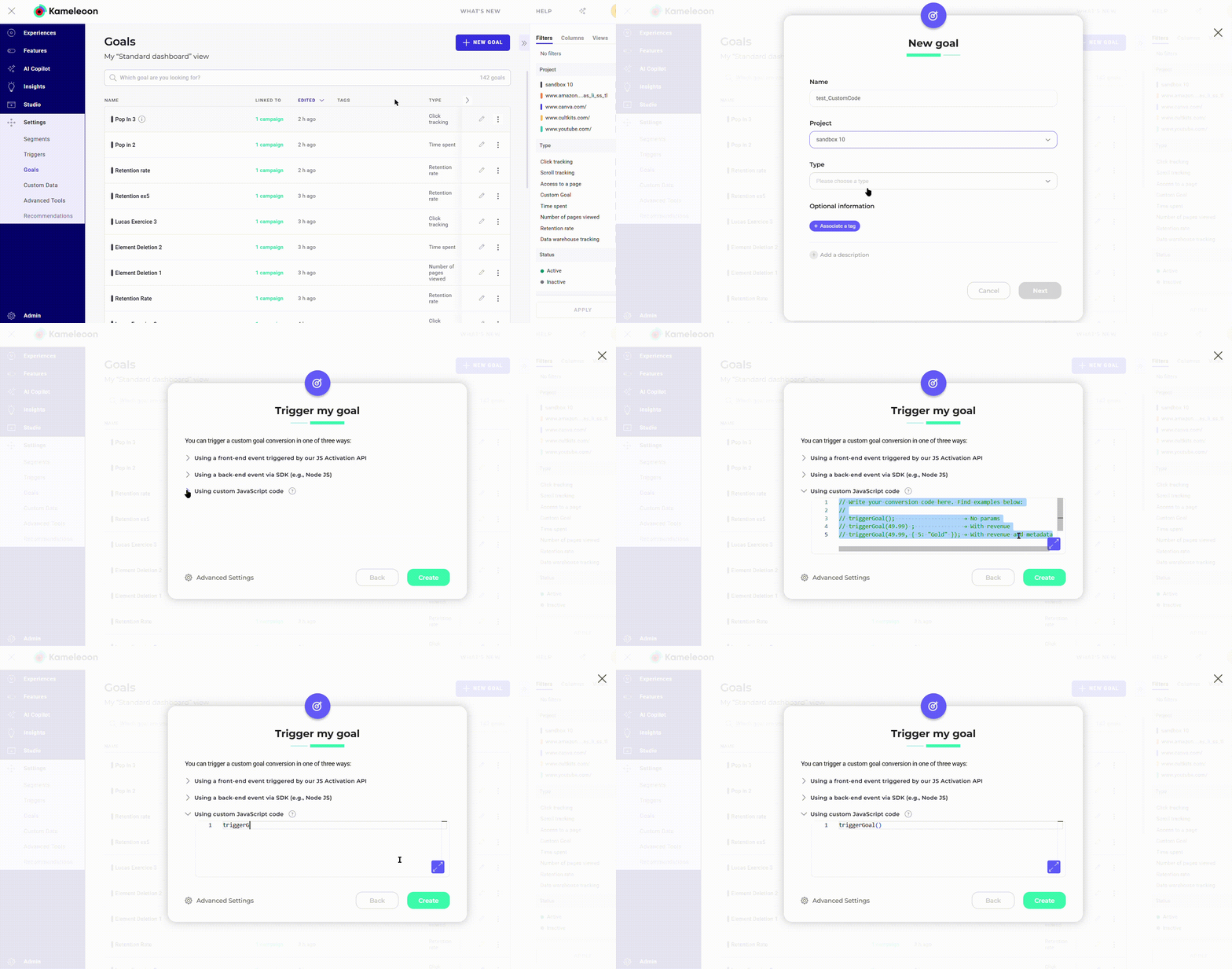
triggerGoal() function triggers the goal from the code panel without requiring a goal ID.
Arguments
Metadata values are accessible through raw data exports and the results page.If you provide the
metadata parameter, Kameleoon uses those values for the current conversion instead of the values you previously collected through setCustomData(). If you omit the parameter, Kameleoon uses the last tracked customData values before the conversion in the same visit.Kameleoon only considers the metadata values you pass directly to the triggerGoal() method; it ignores previously set custom data. In the following example, the conversion associates only with the provided metadata (for example, index 5 with ‘Amex Credit Card’).Kameleoon.API.Data
This module provides methods to set custom data for tracking customer or visit characteristics. It also includes data management methods to retrieve and write data in Kameleoon’s unified LocalStorage.readLocalData
readLocalData() method reads local data you previously stored through writeLocalData(). The engine retrieves this data from unified Local Storage, which bypasses standard storage limitations.
Arguments
Return value
performRemoteSynchronization
performRemoteSynchronization() method triggers a Server Synchronization Call (SSC) to the Data API. This call retrieves visit history stored on Kameleoon backend servers for the current visitor and writes it to LocalStorage. This ensures that the data is accessible through the Activation API and available for targeting. This method typically runs automatically for cross-device reconciliation or Safari ITP; it does not require manual invocation.
Arguments
resetCustomData
resetCustomData() method resets a custom data value.
Arguments
retrieveDataFromRemoteSource
retrieveDataFromRemoteSource() method retrieves data stored on a remote Kameleoon server with the specified key. This method supports retrieving data previously stored through the Data API. Use this for quick storage and retrieval of large data volumes for visitors.
This asynchronous mechanism requires a callback function when the server call completes.
Arguments
setCustomData
setCustomData() method sets a custom data value.
Arguments
writeLocalData
writeLocalData() method records local data in the visitor’s browser for later retrieval through readLocalData(). The engine stores this as unified session data in Local Storage, bypassing standard storage limitations. Data becomes available immediately for retrieval in the same tab through RAM caching, while the physical write occurs asynchronously.
Arguments
Kameleoon.API.Events
This module triggers custom events for experiment and personalization targeting. Review the Activation API events documentation for standard DOM events.trigger
trigger() method triggers a custom event for targeting segments.
Arguments
Kameleoon.API.Tracking
This module integrates Kameleoon results with third-party tracking and analytics platforms, such as Adobe Analytics (Omniture).processOmniture
s_doPlugins() code. Complete these steps within the function:
- Add a call to
Kameleoon.API.Tracking.processOmniture(). - Set the
window.kameleoonOmnitureCallSentglobal variable totrueto track initial call transmission. Although you can set this variable elsewhere, you should set it withins_doPlugins().
Arguments
Kameleoon.API.Products
This module provides access to the product catalog. Use it to register product views or purchases, add products to a cart, retrieve recommendations, or obtain product statistics, such as hourly or daily view and purchase counts.This module is available when subscribed to the Product Recommendation module or Product Targeting add-on.
obtainRecommendedProducts
obtainRecommendedProducts() method retrieves recommended products computed by the specified algorithm through an asynchronous server call.
Arguments
Parameters to control the data returned by the recommendation platform
API response
The callback function receives the API response object with the following values.trackAddToCart
trackAddToCart() method triggers when a visitor adds a product to the shopping cart.
Arguments
Parameters for the recommendation platform
trackAddToWishList
trackAddToWishList() method executes when a visitor adds or removes a product from the wish list or favorites.
trackCategoryView
trackCategoryView() method executes for each category page view during a session.
Arguments
trackProductView
trackProductView() method executes for each product view during a session. This method allows Kameleoon to build an automated product catalog without an XML feed integration, which simplifies the setup of product recommendation projects.
Arguments
trackSearchQuery
trackSearchQuery() method records user search queries.
Arguments
trackTransaction
trackTransaction() method executes when a transaction or purchase occurs.
Arguments
Additional parameters for trackTransaction
obtainInstantSearchProducts
obtainInstantSearchProducts() method retrieves personalized instant search results from Kameleoon Search through an asynchronous server call.
Arguments
API response
The callback function receives the API response object with the following values.obtainFullSearchProducts
obtainFullSearchProducts() method to retrieve full search results from the Kameleoon Search solution with filtering options.
Arguments
Parameters to filter results
API response
The callback function receives the API response object with the following values.obtainProductInteractions
obtainProductInteractions() method retrieves interaction metrics for products tracked via trackProductView(), trackTransaction(), or trackAddToCart().
Arguments
API Response
obtainProductData
obtainProductData() method retrieves product information for items sent via trackProductView().
Arguments
API Response
obtainRecommendedCollections
obtainRecommendedCollections() method retrieves products from the specified collection.
Arguments
API response
Products
API returns an array of objects. Each object in theproducts array contains the following:
Kameleoon.API.Experiments
This module provides methods to access live experiments.This module is only available with Kameleoon Web Experimentation solution.
assignVariation
assignVariation() method forces the association of a specific variation for an experiment, which overrides the standard allocation algorithm. If you call this before the experiment triggers, the engine pre-allocates the variation for later activation. If the experiment has already triggered, set the override argument to true to replace the existing association.
Arguments
block
block() method prevents an experiment from triggering or activating, including manual calls through trigger(). The block applies to the current page by default until the next Kameleoon.API.Core.load(). Set the visit argument to true to block the experiment for the entire visit.
Arguments
getAll
getAll() method returns all live experiments (running, not draft/paused/stopped).
Return value
getActive
getActive() method returns active experiments for the current visit and page. An experiment is active if its variation code has executed in the current session context. To retrieve experiments that you activated on other URLs during the visit, use getActivatedInVisit().
Return value
getById
getById() method returns the experiment for the specified ID.
Arguments
Return value
getByName
getByName() method returns the experiment for the specified name.
Arguments
Return value
getTriggeredInVisit
getTriggeredInVisit() method returns all experiments triggered during the current visit.
Return value
getActivatedInVisit
getActivatedInVisit() method returns all experiments activated during the current visit.
Return value
trigger
trigger() method forces an experiment to trigger, bypassing targeting segment conditions. This action initiates the experiment but might not activate it.
Arguments
Kameleoon.API.Personalizations
This module provides methods to access live personalizations.disable
disable() method marks a personalization as disabled. Use this for interactive elements like pop-ins. When a user closes the element, call disable() to update the personalization status. Kameleoon automatically implements this call for native, non-custom interface elements.
Arguments
getActive
getActive() method returns active personalizations for the current visit and page. A personalization is active if its variation code has executed and the associated action remains visible. To retrieve personalizations that triggered on other URLs or that are now closed, such as pop-ins, use getTriggeredInVisit().
Return value
getAll
getAll() method returns all live personalizations (running, not draft/paused/stopped).
Return value
getById
getById() method returns the personalization for the specified ID.
Arguments
Return value
getByName
getByName() method returns the personalization for the specified name.
Arguments
Return value
getTriggeredInVisit
getTriggeredInVisit() method returns all personalizations triggered during the current visit.
Return value
getActivatedInVisit
getActivatedInVisit() method returns all personalizations activated during the current visit.
Return value
trigger
trigger() method forces a personalization to trigger, bypassing targeting segment conditions. This action initiates the personalization but might not activate it.
Arguments
Kameleoon.API.Variations
This module provides methods to manage variations.execute
execute() method executes JavaScript and applies CSS for the specified variation ID.
Kameleoon.API.Segments
This module provides methods to manage segments and targeting.getAll
getAll() method returns all live segments, including those associated with experiments, personalizations, or Audience tracking.
Return value
getById
getById() method returns the segment for the specified ID.
Arguments
Return value
getByName
getByName() method returns the segment for the specified name.
Arguments
Return value
reevaluate
reevaluate() method forces an immediate re-evaluation of the targeting conditions for the specified segment. Evaluation typically occurs at page load, resulting in statuses of true, false, or undefined. This method restarts the evaluation process as if the engine just initialized.
Arguments
trigger
trigger() method forces a segment trigger for the current visitor and bypasses targeting conditions.
Arguments
Kameleoon.API.Triggers
This module provides methods to manage triggers and targeting.getAll
getAll() method returns all live triggers, including those associated with experiments, personalizations, or Audience tracking.
Return value
getById
getById() method returns the trigger for the specified ID.
Arguments
Return value
getByName
getByName() method returns the trigger for the specified name.
Arguments
Return value
reevaluate
reevaluate() method forces an immediate re-evaluation of the targeting conditions for the specified trigger. Evaluation typically occurs at page load, resulting in statuses of true, false, or undefined. This method restarts the evaluation process as if the engine just initialized.
Arguments
trigger
trigger() method forces a trigger to fire for the current visitor and bypasses targeting conditions.
Arguments
Kameleoon.API.Utils
This module provides utility methods for common operations.addEventListener
addEventListener() method attaches an event handler to the specified element.
Kameleoon resets all event listeners created via this API during engine reloads. Use this method to add listeners in SPAs to ensure proper cleanup.
Arguments
addUniversalClickListener
addUniversalClickListener() method attaches a click handler that listens for mouse clicks on desktop and touchdown events on mobile devices and tablets. For mobile devices, a touchdown occurs if the engine detects a touchstart event followed by a touchend event without an intermediate touchmove.
Kameleoon resets all listeners created via this API during engine reloads, facilitating cleanup in SPAs.
On desktop devices, right-clicks trigger this method (e.g., when opening a link in a new tab).
Arguments
clearInterval
clearInterval() method clears a timer you set through setInterval().
Arguments
clearTimeout
clearTimeout() method clears a timer you set through setTimeout().
Arguments
computeHash
computeHash() method computes a hash from a string. Use this to process unique data without manipulating sensitive personal information directly.
Arguments
Return value
getURLParameters
getURLParameters() method parses the current URL and returns all detected parameters. This method supports both search (?) and hash (#) parameters.
Return value
performRequest
performRequest() method initiates a call to a remote web server.
Arguments
querySelectorAll
querySelectorAll() method returns all document elements matching the specified CSS selectors as a static NodeList object.
This method supports selectors with :contains and :eq.
Arguments
Return value
setInterval
setInterval() method executes a function or expression at the specified interval in milliseconds.
Kameleoon resets all intervals created via this API during engine reloads. Use this method in SPAs to ensure proper cleanup.
Arguments
Return value
setTimeout
setTimeout() method executes a function or expression after the specified number of milliseconds.
Kameleoon resets all timeouts created via this API during engine reloads. Use this method in SPAs to ensure proper cleanup.
Arguments
Return value
Kameleoon.API.Visitor
This module provides a shortcut to obtain a reference to the current Visitor object. The Activation API contains a single, unique Visitor object. This module also allows you to override the visitor code.setVisitorCode
setVisitorCode() method overrides the Kameleoon VisitorCode, which is a unique identifier randomly generated for every visitor. Ensure that your ID is unique and does not exceed 255 characters.
Call this method as early as possible, specifically before Kameleoon triggers any experiments. If you update the VisitorCode after the engine assigns a variation, the engine reassigns the variation.
Kameleoon.API.CurrentVisit
This module provides a shortcut to obtain a reference to the current, in-progress Visit object. It references the same object asKameleoon.API.Visitor.visits[Kameleoon.API.Visitor.visits.length - 1].
Configuration
A Configuration object holds global constant values related to the current configuration of Kameleoon on this site.Properties
Visitor
A Visitor object contains visitor-scoped data independent of specific visits. This object includes a list of all Visit objects for the visitor.Properties
Visit
A Visit object represents a single visit and contains real-time information that Kameleoon gathers. Data points include visit context (device, location), observed behavior (duration, page views), and Kameleoon operations, such as triggered experiments or personalizations.Properties
The
kameleoonConversionScores property is only available with the AI Predictive Targeting add-on.Device
A Device object contains data about the device for a given visit.Properties
Geolocation
A Geolocation object contains data about the physical location of the visitor for a given visit.Properties
Weather
A Weather object contains data about the weather conditions occurring at the time of the visit.Properties
Experiment
An Experiment object represents a Kameleoon A/B test. Core properties include the segment and associated variations. Variations contain the JavaScript and CSS code that implements the changes.Properties
Personalization
A Personalization object represents a Kameleoon personalization action for a specific segment. Core properties include the segment and the associated single variation. The Variation object contains the JavaScript and CSS code that implements the personalization action.Properties
ExperimentActivation
AnExperimentActivation object represents an experiment activated during a specific visit. Because visits can be historical, the associated experiment might have stopped. In such cases, the engine does not inject experiment metadata (name, launch date, segment) into the application file, which makes it unavailable through the API. However, IDs remaining available.
Properties
PersonalizationActivation
APersonalizationActivation object represents a personalization activated during a specific visit. As with experiments, metadata is unavailable if the personalization has stopped, although IDs remain accessible.
Properties
Variation
AVariation object represents a component of an Experiment. An A/B test contains multiple variations, such as an A/B test with one variation plus reference or an A/B/C test with two plus reference. Personalizations associate with a single Variation object.
During variation code execution, the
this keyword references the corresponding Variation object. Use this reference to navigate the object hierarchy (for example, through the associatedCampaign property).Properties
Template
ATemplate object represents an instantiated Widget template. Use templates to generate variations from a common codebase through the Kameleoon app interface. A Template object contains predefined fields and their values for the associated variation.
Properties
Goal
AGoal object represents a Key Performance Indicator (KPI) defined in the Kameleoon app.
Properties
Segment
ASegment object contains criteria that a visit must fulfill to belong to the segment. On the Kameleoon platform, segments include constant conditions, such as age or location, and triggering conditions, such as time on page or cart contents.
Properties
Trigger
A Trigger object contains criteria that a visit must fulfill to fire the trigger. On the Kameleoon platform, triggers include constant conditions, such as age or location, and triggering conditions, such as time on page or cart contents.Properties
Product
AProduct object describes items in a catalog. Most properties are optional and might be null.